In the previous article, I described how using Obsidian helps me manage information overload and work more effectively. But a note is only useful if you can find it again weeks later.
Today I’ll share how I structure my note system.
The effectiveness of a note-taking system is measured by one thing: how quickly and easily you can locate a note weeks later. This is why I strive to create a system that serves as a “cache” of knowledge, enabling me to find solutions to problems more efficiently.
I use the following principles to maintain an effective yet simple system:
- Write notes as messages to my future self.
- Focus on connections instead of hierarchy (see “Connections, tags and folders” below).
Write notes as messages to my future self
To efficiently find and reuse information, I write notes from my future self’s perspective—considering how I will retrieve them. Spending a few extra seconds to answer the questions below saves much more time later.
- What contexts will help me find this note: a project, technology, person, or team?
- Why will I need this note in a few weeks, and in which situation will it speed up my work?
Engineering problems and solutions: building hub notes
Most of my notes capture engineering problems and the solutions I found. For example, the first time I used jest-e2e (an internal tool for running E2E tests), I struggled to understand why a test had failed. I spent an hour trying to figure it out, only to discover that a missing feature flag setting was causing the wrong branch to run.
To prevent wasting time on this issue again, I created a note titled “If E2E is broken, be sure the right Feature Flag is set up” to describe the problem and the solution. I linked this note to others titled “Jest-E2E” and “Feature Flag”.
Another example is a tricky bug related to Relay, where the cache was misused. To identify the root cause, I had to dive deep for a few hours, as it initially seemed like caching was the obvious issue. The correct solution turned out to be refreshing multiple connections.
After fixing the bug, I wanted to ensure I left a guide for myself and others to navigate a similar process more efficiently in the future. To accomplish this, I took detailed notes documenting the problem and solution, titled “Relay allows refreshing multiple connections, use it instead of cache invalidation” and “Be cautious with cache invalidation for Relay”. I linked all of these notes to a central “Relay” reference for easy access.
Keywords like “Relay,” “Jest-E2E,” or “Feature Flag” serve as conceptual notes, grouping related insights, problems, and solutions around that concept.
So what is the benefit of this approach?
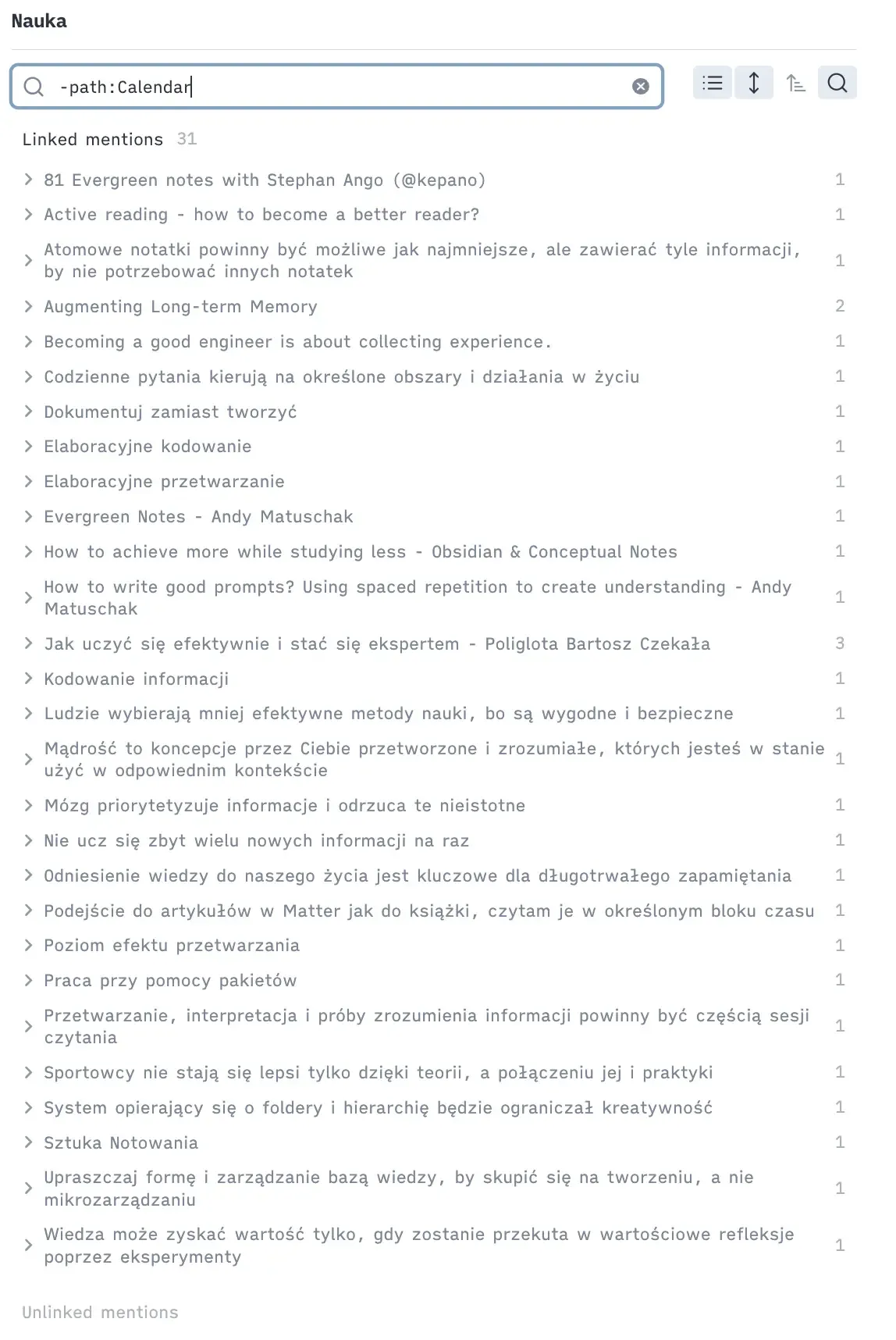
I can easily see all references to a particular keyword across my entire vault. When I next encounter a weird end-to-end test or Relay problem (or just want to explain these topics to others), I can easily access all related notes by visiting the hub note. The note itself can remain empty; the backlinks are what truly matter.
Projects and meetings
Similarly, you can create notes on a specific project or initiative to keep all related information in one place. For example, during a meeting you can quickly jot something down and add [[ProjectX]] to link it to the project.
Obsidian allows you to filter backlinks; for example, you can narrow them down to meeting notes only (using the #type/meeting tag described below). This is especially useful for double-checking a decision made in “some meeting in the past” about Project X.
Scaling the system with connections
A system based on connections is super easy to grow and scale organically.
If you have a lot of notes about testing and feel you need better navigation, you can build an “abstraction” for it—another level.
Link keyword notes to a more generic note like “Jest E2E” -> “Testing”. This is still a link, not a folder, so one keyword note can sit under several generic notes at the same time.
That way you can navigate these keyword notes top-down or bottom-up.
Connections, tags and folders
Obsidian offers three ways to organize notes: connections, tags and folders. Here is how I use each of them—and why connections do most of the work.
Connections handle navigation, tags handle filtering, and folders exist mainly for tooling.
Connections
My system relies on connections rather than strict hierarchy. A hierarchical structure requires everything to be in one place, but notes often cover several ideas, so a single note can belong to several keywords at once. Connecting a note to several keywords also makes it easier to find weeks later, because each connection is another path back to it.
For example, if I were to add a note about a certain decision made by “X” and “Y” related to “Project X” during “Meeting A,” I would have four different starting points to reach it again: “X,” “Y,” “Project X,” and “Meeting A.” That makes the information much easier to find.
Tags
If you think about a note as an object storing information, tags are the attributes describing that object (type, status, date). I use them on notes and on bullet points in daily notes as additional metadata to filter relevant information. Typical tags I use are #type/meeting, #type/article, #type/podcast, #flashcard, #todo, #💡.
Folders
I use folders mostly to integrate them with other systems, e.g., the terminal, iOS, Obsidian Sync, Readwise or Claude Code.
As I mentioned, I avoid hierarchy and keep the folder structure as flat as possible. Thanks to connection-based organization and the advanced search offered by Obsidian, I don’t feel the need for a more precise structure.
This connection-based system gives me confidence that I can store information safely and find it later. Writing notes for my future self and linking them through hubs instead of folders is what turns the vault into a real “cache” of knowledge.
This system has helped me reduce information overload, and I hope these ideas help you create your own system.